Stop testing in TestFlight
Open TestFlight and select the app. Scroll to the bottom of its page, choose Stop Testing, and confirm.
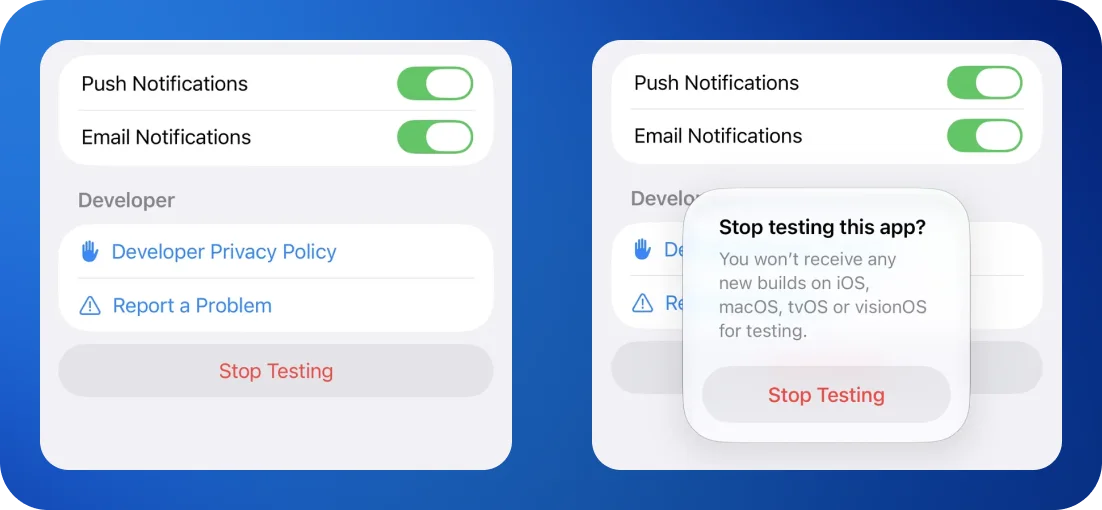
This ends participation immediately, and no further beta builds arrive.
Rejoining needs a new invitation
An invitation only works once. After stopping, the original email and link report that the invitation "has been revoked or is invalid" . This is normal, and not a sign anything is broken.
Coming back to the beta later is no trouble at all. It just needs a fresh invitation from us. Send a line to support@kiren.com and we will sort it out.
Remove the test version
Stopping the test does not remove the build already on the device. Delete the app as normal, by pressing and holding its icon on the home screen and choosing to remove it.
Install the public app
Open the App Store, search for F‑Secure Mobile Security, and install it. This is the ordinary public version, the same one that was there before testing started.
Signing in with the same account restores the subscription and settings.
The subscription is not affected
A subscription is held against the Apple Account that bought it, not against the beta. Joining or leaving the test does not change it, interrupt it, or require anything to be bought again.
Before going
If something specific prompted the decision to stop, we would very much like to know what it was. A single line to support@kiren.com is enough, and it is more useful to us than the testing itself.