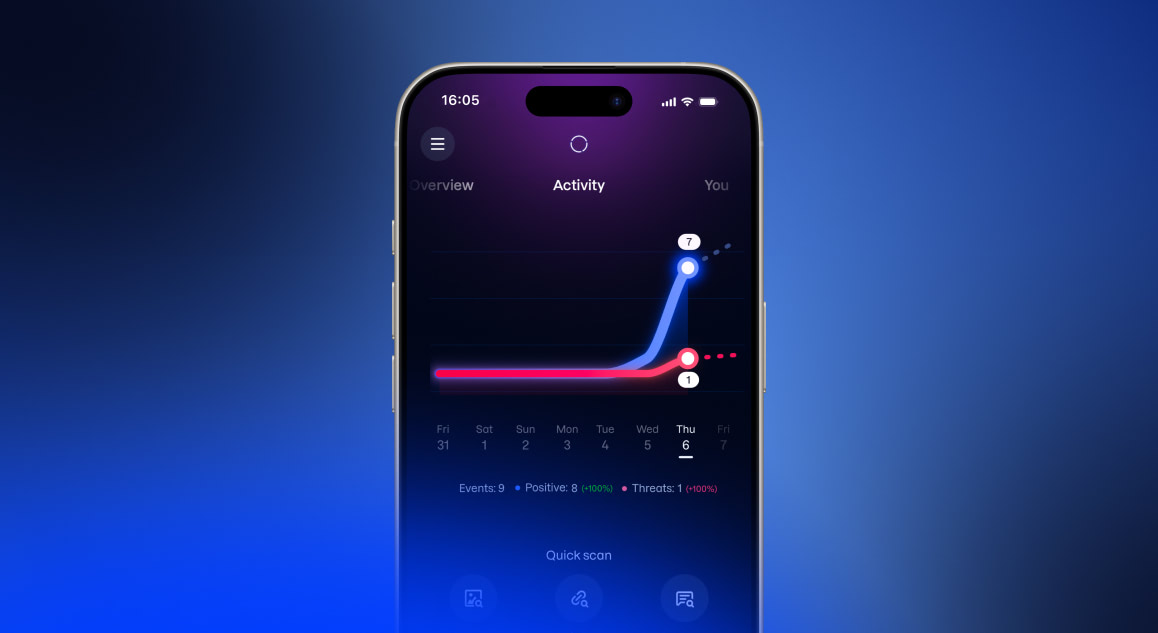
The activity chart
The chart shows the last 7 days and plots two lines: one for safe activity and one for risky activity. Reading the two together gives a clear picture of everyday online safety and shows that protection is active and working.
The lines are daily counts collected from the app's protection features as an example:
Counted as safe activity:
- Safe websites visited while browsing protection is on
- Links confirmed safe by the Link Checker
- Clean results from the Scam Scanner, including deepfake checks
- Clean incoming messages seen by Message Protection
- Messages confirmed safe by the message check
- Clean virus scans and removed threats (Android only)
- Breach checks that found nothing
- Personal details being watched by identity monitoring
Counted as risky activity:
- Blocked or suspicious websites
- Unsafe or suspicious links
- Scams or deepfakes detected in scanned images
- Harmful or unsafe messages
- Virus scans that found an infection (Android only)
- Data breaches found for watched personal details
Activity details
Tapping the chart opens the Activity details screen, which shows a longer history of about 12 weeks. At the top, a totals header shows the numbers for the period (all events, safe events, and threats) together with a percentage change compared to the previous week. A day can be selected on the graph or with the previous/next day arrows, and the screen then lists a breakdown of that day's events by category, such as safe websites, blocked websites, links checked, scams or deepfakes found, device scans, infections found or removed, device lock and OS update events, and breach checks.
Running a quick check
Some checks are run on demand, whenever there is something to look into.
Scam Scanner Opened with the Scams button, the Scam Scanner checks images, and on the Deepfakes side also videos, for scams and deepfake content. It is useful for confirming whether a screenshot, a photo, or a shared clip can be trusted before acting on it. The Scam Scanner is part of Kiren Plus.
Link Checker Checks whether a link is safe before it is opened, avoiding a suspicious or malicious website ahead of time. It also indicates whether a shopping site can be trusted, which is useful before making a purchase from an unfamiliar store.
Messages Checks the text of a message for signs of a scam or phishing attempt, which is helpful when a message seems unexpected or too good to be true.
Protection that runs in the background
Other features work automatically once they have been set up, and report their status on the Activity screen. Browsing Protection, Message Protection, and the device scan on Android are part of Kiren Plus.
Browsing Watches web browsing and blocks access to malicious, phishing, and scam websites in real time.
Message Protection Filters incoming messages, such as SMS, and keeps unsafe or unwanted messages from unknown senders out of the way.
Device Health Keeps track of the device's overall security. On Android, this includes a device lock check and, with Kiren Plus, antivirus scanning. On iOS, it checks that the latest operating system is installed and that a device lock is in place.